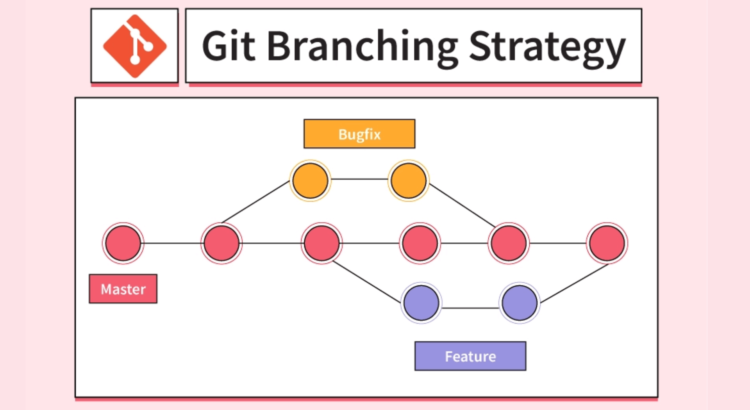
Git is a popular version control system that enables teams to collaborate on code development in a structured and efficient manner. Git’s branching mechanism is one of its most essential features, as it allows teams to work on different features and fixes at the same time without interfering with each other’s work. However, because there are so many alternatives, selecting the best branching technique might be difficult. In this post, we’ll go over the best Git branching strategies for helping teams manage their code more effectively.
In this section, we’ll look at the benefits of each technique. We’ll also go over how to determine the best branching strategy in Git for your team’s needs.
Here, we’ll mainly talk about these four strategies:
- GitFlow
- Truck-Based Development
- GitLab Flow
- GitHub Flow
Let’s Begin
What exactly is GitFlow?
GitFlow is a branching model that employs two major branches: development and release. Developers create feature branches off the development branch after logging in to git. When a feature is finished, it gets merged into the development branch. When a release is complete, a release branch is generated off the development branch and the release is completed on that branch.
What exactly is Trunk-Based Development (TBD)?
Developers working on trunk-based development work on a single branch (typically the primary branch) and produce short-lived feature branches as needed. Using git commands, changes are continuously incorporated into the main branch. Taking this technique lowers the likelihood of merger conflicts.
What is GitLab Flow?
GitLab Flow is similar to GitFlow, however, it contains fewer branches. A master branch and a development branch are the two major branches. Developers construct feature branches separate from the development branch and merge them back in once they are finished. When a release is complete, a tag is added to the master branch.
What is GitHub Flow?
GitHub Flow is a straightforward branching method that emphasizes CICD and deployment continuous integration. After performing a git login, developers establish feature branches off of the main branch (commonly referred to as the “master” branch). Changes are constantly incorporated and tested, and whenever a feature is finished, it is merged back into the main branch.
So, those are the four Git branching mechanisms that we went over in depth here. The branching technique you use is determined by the specific needs and goals of your project. Let’s go over the advantages of each of these branching mechanisms in Git one by one.
Benefits of GitFlow
GitFlow is a common Git branching method that provides a framework for organizing software project development processes. Here are some advantages of utilizing GitFlow:
-
Separation of Concerns: GitFlow divides the development process into stages like development, release, and hotfixes, each with its own dedicated branch. This allows teams to concentrate on specialized tasks while reducing the likelihood of disagreements and errors.
-
Clear Structure: GitFlow provides a clear structure for branching and merging using Git commands. This helps developers understand how changes are made and how they are integrated into the final product.
-
Improved Collaboration: By defining clear roles and responsibilities for each stage of the development process, teams may work together more efficiently. This lowers the need for frequent communication and avoids disagreements.
-
Version Control: GitFlow provides a clear and organized system for version control, making it easier to track changes and roll back to previous versions if necessary.
-
Continuous Integration (CI) and Continuous Delivery(CD): GitFlow supports Continuous Integration (CI) and Continuous Delivery (CD). It does this by providing a structured workflow that can be automated using tools such as Jenkins or Travis CI.
-
Quality Control: GitFlow helps to maintain high quality by enforcing code reviews and testing at each stage of the development process.
GitFlow provides a structured framework for software development that promotes collaboration, version control, and quality control. This is the reason why GitFlow is a popular choice for many development teams.
Benefits of Trunk-Based Development
In Trunk-Based Development, all changes are made directly to the main code trunk, without creating long-lived feature branches. Some benefits of using Trunk-Based Development include:
- Faster Feedback: With all changes being made directly to the main codebase, developers receive feedback on their changes much faster. This allows them to identify and fix issues quickly.
-
Continuous IntegrationCICD: Since all changes are made to the main code trunk, integration issues are caught early in the development process. So, there are no long-lived branches that need to be merged later.
-
Improved Collaboration: Trunk-Based Development encourages developers to work together on the same codebase, which fosters better collaboration and communication.
-
Reduced Complexity: This strategy helps to keep the codebase simple and avoid long-lived feature branches. This reduces the complexity of the development process and makes it easier to maintain the codebase.
-
Faster Releases: With faster feedback and continuous integration CI/CD, Trunk-Based Development enables faster and more frequent releases.
Benefits of GitLab Flow
GitLab Flow strategy combines the principles of Continuous Integration (CI), Continuous Deployment (CD), and Trunk-Based Development. Some benefits that make GitLab Flow, a popular choice for CICD Consulting service providers include,
-
Faster Feedback: GitLab Flow provides rapid feedback loops by promoting the use of automation tools and a highly collaborative workflow. This allows developers to catch and fix issues faster, reducing the time between code changes and feedback.
-
Enhanced Collaboration: GitLab Flow encourages collaboration by enabling team members to work on the same codebase in real time. This creates a unified, streamlined workflow that allows developers to share ideas and knowledge, and work together more efficiently.
-
Increased efficiency: GitLab Flow promotes the use of automation tools, reducing the need for manual intervention in the development process. This leads to higher efficiency, faster development cycles, and a more streamlined workflow. This is the reason why CICD consulting teams prefer to use this strategy.
-
Improved Quality: By using automated testing and code review tools, GitLab Flow ensures that code changes are of high quality and meet the organization’s standards. This reduces the number of errors and improves the reliability and stability of the codebase.
-
Faster Time-to-Market: GitLab Flow enables teams to deliver software faster by providing a streamlined workflow. This allows organizations to bring new features and products to market quickly and reliably.
Benefits of GitHub Flow
GitHub Flow is a git branching strategy that emphasizes collaboration, code review, and Continuous Integration (CI) and Continuous Deployment (CD) practices. Some benefits of using GitHub Flow include:
-
Streamlined Workflow: GitHub Flow provides a simple, streamlined workflow that is easy to understand and follow, This makes this approach ideal for both small and large development teams.
-
Faster Feedback: By integrating automated testing and continuous deployment tools, GitHub Flow provides rapid feedback on code changes. This allows developers to catch and fix issues faster.
-
Increased Collaboration: GitHub Flow emphasizes collaboration through code reviews, pull requests, and discussions. This fosters a sense of community and shared ownership among developers.
-
Improved Quality: GitHub Flow’s emphasis on code reviews, testing, and continuous deployment. This ensures that code changes are of high quality with minimal bugs or zero errors.
-
Greater Flexibility: GitHub Flow is a flexible workflow that can be adapted to fit the needs of any organization. This makes it an ideal choice for CICD consulting teams working on a variety of projects and in different development environments.
Tips for Picking the Right Git Branching Strategy
Consider these factors when choosing a git branching strategy to ensure that the strategy you choose suits your team and project needs:
-
Team Size: If you have a small team, a simple branching strategy like trunk-based development may be more appropriate. However, for larger teams, a more complex branching strategy like GitFlow may be needed.
-
Project Complexity: The complexity of your project can also influence the branching strategy you choose. If your project is simple, a simpler branching strategy may be sufficient. However, if your project is more complex, you may need a more sophisticated branching strategy like GitFlow.
-
Development Workflow: Your development workflow can also influence the branching strategy you choose. For example, if you have a continuous integration/continuous deployment (CI/CD) pipeline in place, you may want to choose a branching strategy that allows for easier integration of changes into the pipeline.
-
Release Frequency: If your team releases frequently, you may want to choose a branching strategy that allows for easier release management, such as GitLab Flow.
-
Risk Tolerance: Some branching strategies may involve more risk than others, so your team’s risk tolerance may also influence the branching strategy you choose. For example, a trunk-based development strategy may be riskier than GitFlow because changes are committed directly to the main branch.
I’m confident you have a better knowledge of the various Git branching techniques and how they might assist your team’s code management process after reading this post.