Introduction
In the fast-paced world of software development, effective collaboration and streamlined workflows are essential for success. Git, a powerful distributed version control system, has revolutionized the way teams collaborate on code and manage their development processes. In this blog post, we will explore how Git enables teams to collaborate effectively and automate their workflows, leading to increased productivity and improved software delivery.
What is Git, and Why is it Ideal for Teams?
Git is a distributed version control system that allows developers to track changes in their codebase and collaborate seamlessly with team members. Unlike centralized version control systems, Git provides each team member with a local copy of the entire repository, enabling them to work offline and independently. This decentralized approach ensures that teams can collaborate efficiently, even across geographically dispersed locations.
Collaborating Effectively with Git
-
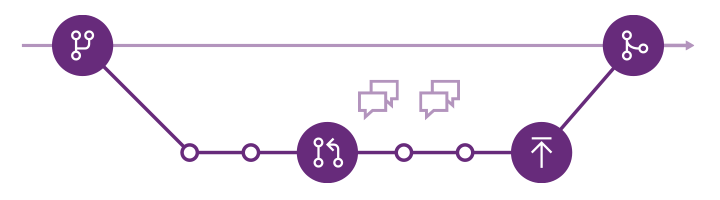
Branching and Merging: Git’s branching model empowers teams to work on features, bug fixes, and enhancements in isolated branches. Developers can create feature branches, experiment with code changes, and collaborate without interfering with the main codebase. Once the changes are tested and reviewed, they can be merged back into the main branch, ensuring a smooth and controlled integration process.
-
Pull Requests: Pull requests are a key feature in Git-based collaboration. They facilitate code reviews and discussions among team members before merging changes into the main branch. Pull requests ensure that code quality is maintained, and potential issues are addressed before they impact the project.
-
Faster Feedback Loops: Git’s distributed nature enables developers to commit code changes locally and push them to the central repository when ready. This shorter feedback loop accelerates the development process, as team members can quickly review, test, and respond to changes.
-
Collaboration Across Teams: With Git, multiple teams can collaborate seamlessly, even on different parts of the project. Each team can maintain its own set of branches and repositories, enabling parallel development without conflicts.
The Importance of a Branching Strategy
A branching strategy defines how code changes are managed, organized, and integrated with a version control system. A well-designed branching strategy offers the following benefits:
-
Parallel Development: It enables multiple developers or teams to work simultaneously on different features or bug fixes without interfering with each other’s work.
-
Code Isolation: Branches provide a safe and isolated environment to develop new features or fix bugs, preventing conflicts with the main codebase.
-
Release Management: A branching strategy allows organizations to manage releases efficiently by stabilizing specific branches for production deployment.
-
Easy Rollbacks: In cases of critical issues, a proper branching strategy makes it easier to roll back changes to a known working state.
Automating Your Workflow with Git
-
Continuous Integration and Continuous Deployment (CI/CD): Git integrates smoothly with CI/CD pipelines, enabling teams to automate the build, test, and deployment processes. By setting up automated pipelines, teams can ensure that changes are continuously integrated, tested, and deployed to production environments efficiently and with minimal manual intervention.
-
Git Hooks: Git provides pre-commit, post-commit, pre-push, and other hooks that allow teams to automate actions based on specific events. For example, pre-commit hooks can enforce coding standards, and post-commit hooks can trigger automated tests or notifications.
-
Git Workflow Customization: Git’s flexibility allows teams to customize their workflows to match their specific development processes. Whether it’s feature branching, Gitflow, or another model, teams can tailor Git to suit their needs.
How to Start Applying a Branching Strategy in Your Organization
-
Analyze Your Workflow: Understand your organization’s development workflow, release cycles, and team structure. Determine where branching can add value and streamline collaboration.
-
Choose the Right Version Control System: Evaluate whether Git or SVN aligns better with your organization’s development and collaboration needs. Consider factors such as team size, workflow complexity, and existing infrastructure.
-
Define Branch Types: Decide on the types of branches your organization needs. Common branches include feature branches, release branches, hotfix branches, and the main development branch (e.g., master or trunk).
-
Create Guidelines and Naming Conventions: Establish clear guidelines and naming conventions for branches to maintain consistency and facilitate understanding across the organization.
-
Train and Educate Teams: Provide training and support to your development teams on the chosen branching strategy. Ensure that all team members understand the rationale behind the strategy and how to use it effectively.
-
Implement and Iterate: Start applying the branching strategy gradually in your development process. Monitor its impact, gather feedback from teams, and be open to iterating and improving the strategy based on your organization’s evolving needs.
Conclusion
Git has transformed the way teams collaborate and manage their development processes. Its distributed nature, powerful branching model, and automation capabilities make it an ideal choice for teams seeking to collaborate effectively and streamline their workflows. By leveraging Git’s features for branching, merging, pull requests, and automation, teams can accelerate their development cycles, improve code quality, and deliver software faster and with greater confidence. Embracing Git for teams is a strategic move that enhances collaboration, empowers developers, and drives successful software projects in the dynamic landscape of modern software development.